ABOUT DISPLAY DIMMER

It started with
one stubborn monitor.

A personal fix for my Windows setup became an app for other people’s screens, too.

Nathan · Vantari WorksIndependently developed in British Columbia, Canada.

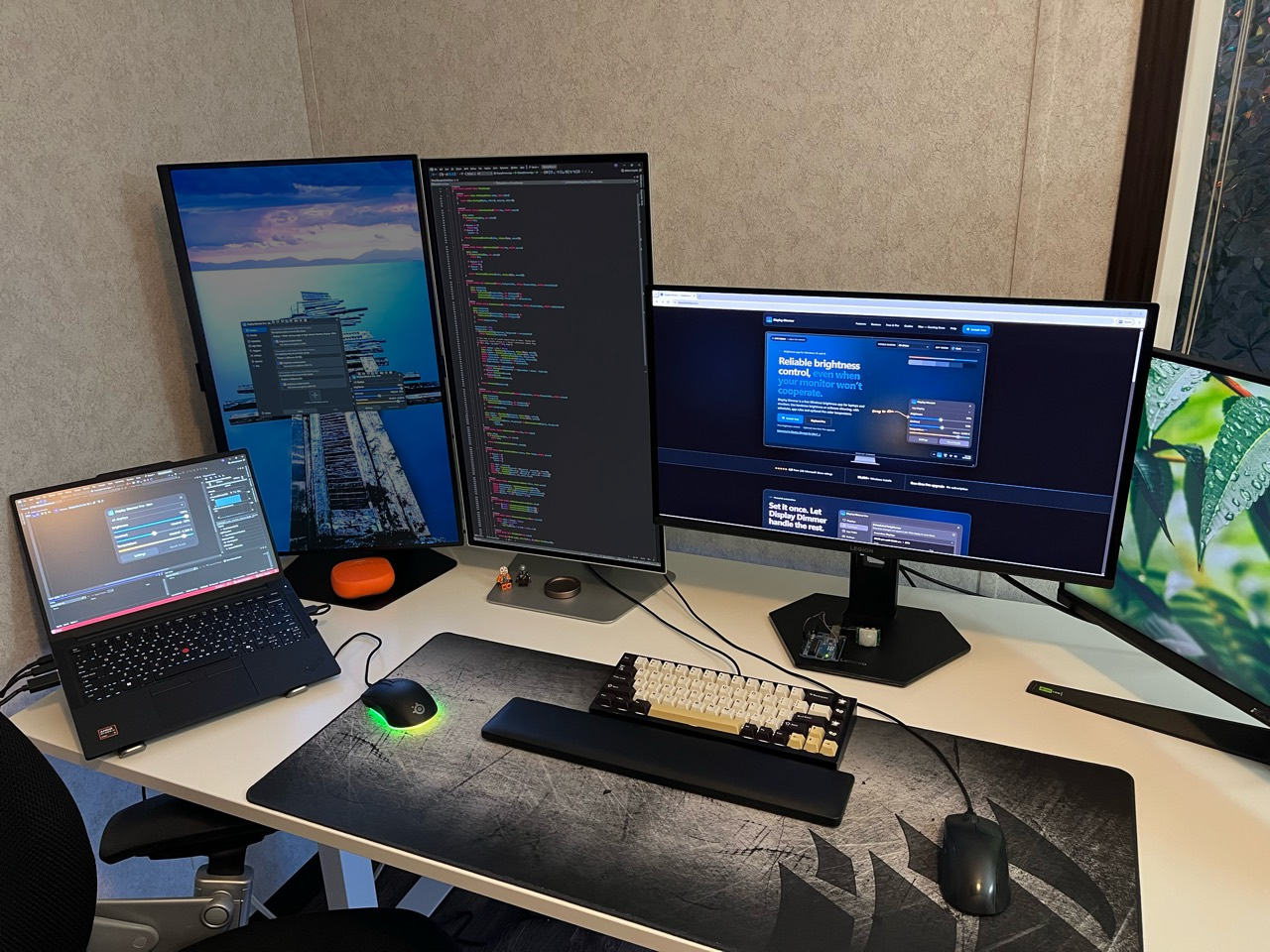
Display Dimmer’s test setup with a laptop, two portrait monitors and two landscape monitors, showing the app and its website.
Testing soon outgrew my original two-monitor setup. These are some of the displays I use today.

THE BEGINNING

October 2025
Development began
November 2025
First public release

Why I built Display Dimmer.

I started Display Dimmer because I couldn’t reliably dim one of the monitors in my own Windows setup. After trying a few popular brightness apps from the Microsoft Store, I ran into an unusual problem with my Samsung G5: the apps could read information from it, but attempts to change its brightness through DDC/CI made it disconnect and reconnect repeatedly. None of the apps I tried offered gamma-based software dimming as a fallback for that display. I didn’t mind how it was dimmed. I just wanted my secondary screen to be less bright.

I built Display Dimmer to detect those repeated reconnects, stop retrying hardware control and fall back to gamma-based software dimming. A couple of months into development, I discovered that adjusting brightness in the G5’s own menu could get DDC/CI responding again, as though it needed to be woken up first. A later firmware update fixed my monitor, but that experience gave the app a purpose beyond my own setup: helping people dim their screens even when hardware control was unreliable.

Turning that idea into a Windows desktop app was new to me. I had experience with HTML, CSS, Lua and Python, along with designing websites and graphical interfaces. The first version was rough: a couple of simple sliders made for my own setup. I began development in October 2025 and released it on the Microsoft Store the following month.

More than 20 people installed it on the first day, which was already more than I’d expected. About a week later, it reached 100 installs in a single day. I felt the app still needed work before it was ready for that many people, so I temporarily removed it from the Store, spent more time improving it, and released it again as version 2.0.

That response changed how I approached the app. I’d made it to solve a problem at my own desk, and now other people were relying on it. Updates often came just days apart, sometimes the very next day, as I worked on the interface, fixed bugs and added features I thought people would find useful. Testing also grew beyond my original setup, so I could understand how the app behaved on different displays and Windows systems.
A FEW MILESTONES

Display Dimmer, over time.

From a couple of sliders to a more capable app.

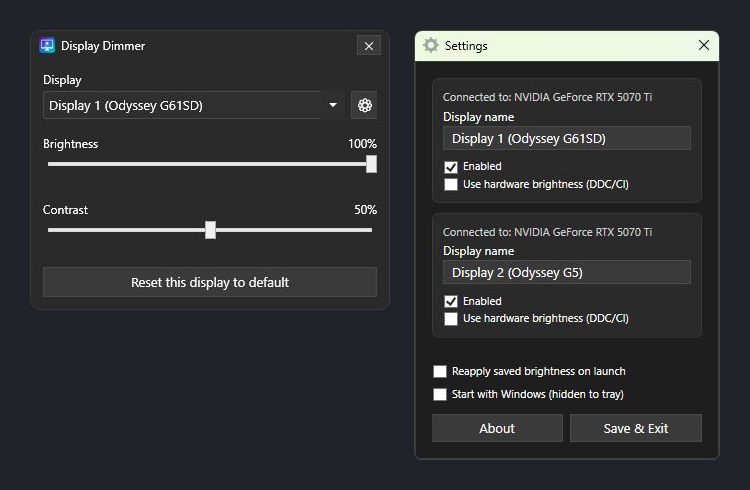
Display Dimmer 1.0.0 with brightness and contrast sliders, and its original per-display settings window.

· Free

A simple beginning.

The first release: brightness, contrast and a small window for per-display settings. It was built around my own setup, with the focus on getting dimming to work reliably.

View larger
Display Dimmer 2.0.0 in its original Dark theme, with the redesigned main window and per-display Settings window.
Display Dimmer 2.0.0 in its original Dark theme, with its main window and Settings tab showing launch behavior, themes and opacity.

· Free

A stronger foundation.

Version 2.0 refreshed the interface and expanded Settings, while improving startup, tray behavior and how display settings were saved and restored.

View larger
Display Dimmer 2.1.13 in Dark theme, with its main window and Displays settings.
Display Dimmer 2.1.13 in Dark theme, with its main window and Schedules tab showing an example overnight brightness schedule.

· Pro shown

An optional Pro upgrade.

The optional Pro upgrade added unlimited rules and extra themes, while everyday brightness controls remained free.

View larger
Display Dimmer 2.2.0 in Dark theme, with the main window beside the redesigned Settings window and its sidebar navigation.
Display Dimmer 2.2.0 in Dark theme, with its main window and Hotkeys page showing the two default brightness shortcuts.

· Pro shown

More room to grow.

Adding hotkeys meant rethinking the Settings layout. Sidebar navigation made room for more features as the app grew.

View larger
Display Dimmer 2.2.12 in Dark theme, with the optional preset selector in its main window and the Displays tab.
Display Dimmer 2.2.12 in Dark theme, showing the preset selector and Temperature slider in the main window, with saved display levels in the Presets tab.

· Pro shown

Your settings, ready to recall.

Saved presets brought brightness, contrast and temperature together, ready to recall from the main window, tray menu or automation.

View larger

MADE INDEPENDENTLY

British Columbia, Canada

Simple to use. Powerful when you need it.

I’m Nathan, the developer behind Display Dimmer and Vantari Works, based in British Columbia, Canada. I look after the app’s design, development, testing, updates and support.

Some of the improvements I enjoy most begin with an idea from someone using the app. I like working directly with people to understand what they have in mind, build the feature and refine the details together.

My goal is to keep Display Dimmer simple for quick adjustments, with more power available when you need it. Your bug reports and suggestions help me improve it for setups beyond my own.

Have an idea or need a hand?

FREE AT ITS CORE

Useful from the start.

Keep the essentials accessible.

Display Dimmer began with a simple need, and I want its everyday brightness and contrast controls to remain free, without a time limit or subscription.

For people who want more customization and automation, Pro is an optional one-time purchase. Those purchases support continued development while keeping the core app available to everyone.

STILL IMPROVING

Thanks for being part of it.

If you’ve downloaded Display Dimmer, reported a problem, left a review or shared an idea, thank you. You’ve helped turn a little utility for my own monitors into something useful for others.

— NathanVantari Works · British Columbia, Canada