Still too bright at minimum?
Software dimming can darken the image beyond the monitor's lowest hardware brightness setting.
Display Dimmer helps when your screen is still too bright, even after lowering the normal Windows or monitor brightness setting.
Software dimming can darken the image beyond the monitor's lowest hardware brightness setting.
Select one display when you want a darker secondary screen without changing your main screen.
Test software dimming on your own setup. HDR, graphics drivers, and color-management tools can affect gamma behavior.
A monitor's lowest brightness setting may still feel too bright in a dark room. Lowering the hardware setting and darkening the image are different controls: DDC/CI changes a supported monitor setting, while software gamma dimming changes the image Windows sends to the display.
If normal hardware brightness is already low enough, use it. If you need a darker image, follow the software-mode steps below. For everyday per-monitor controls, see the external monitor brightness slider guide.
Use this setup for an external monitor that is still too bright at its lowest setting. Display Dimmer's Brightness slider uses one brightness method per display; select software brightness before lowering the image further.
In software mode, 100% means no additional brightness dimming from the app. A lower value darkens the image; it does not lower the monitor's hardware setting further.
For a built-in laptop screen: lower its hardware brightness with the laptop’s brightness keys or Windows Display settings. Select that panel in Display Dimmer, then lower the app’s Brightness slider to add software dimming below the panel’s hardware minimum.
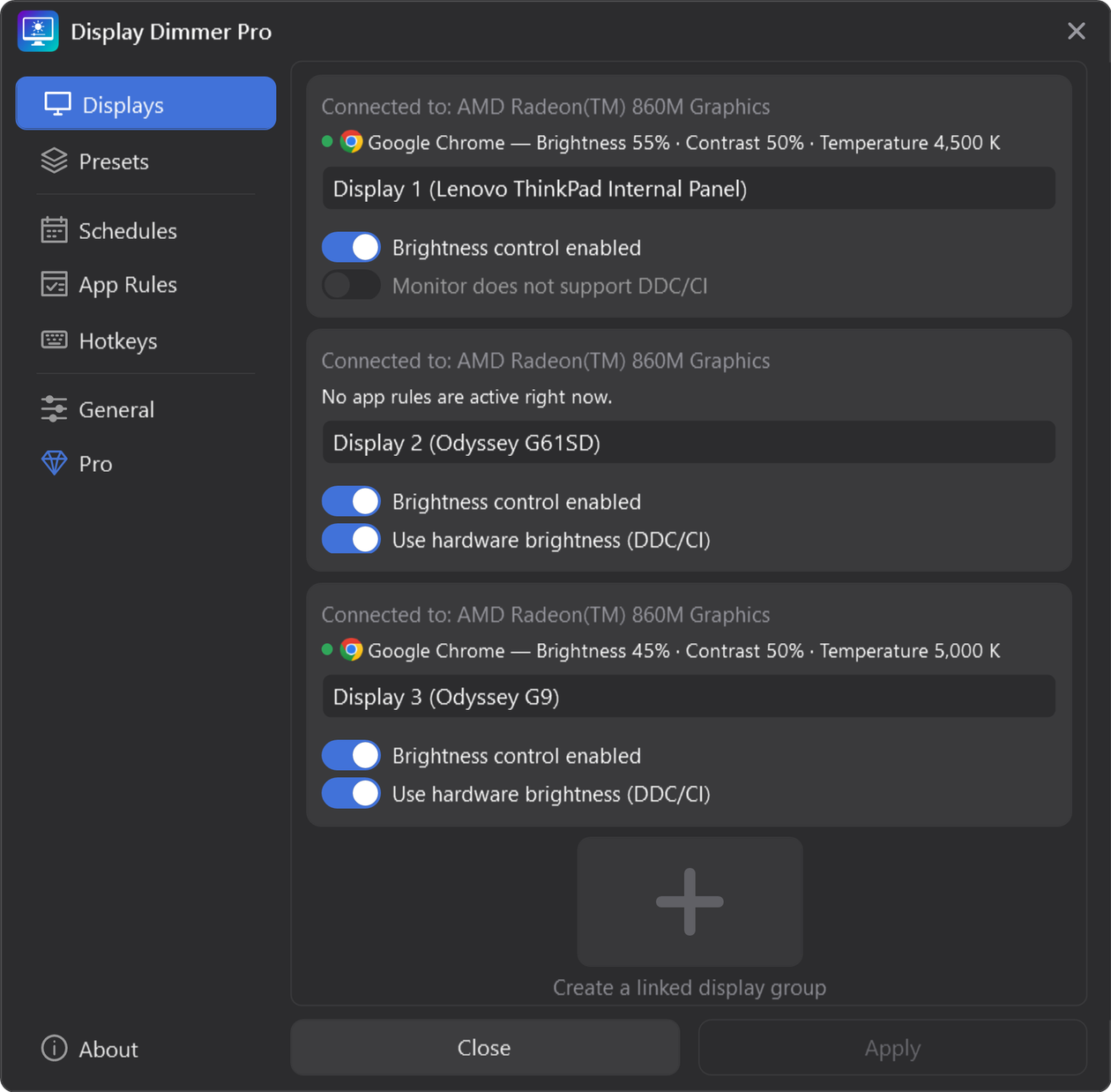
Gamma dimming can change shadow detail and color appearance. Check the gamma dimming and color accuracy guide if those matter for your work. If the image does not change, test with HDR temporarily off; software dimming is not guaranteed in HDR mode.
Select the same display and move Brightness back to 100% to remove software brightness dimming. To return the app's brightness, contrast, and temperature controls to their neutral values together, use Reset levels.
Reset levels applies to your selected display or group. With All displays selected, it resets every enabled display. In software mode, it does not undo a low brightness setting you chose with the monitor's physical buttons; raise that setting separately when needed.
Reset levels is a manual reset, not Resume automation. It saves the reset levels and can interrupt an active schedule or app rule when those levels conflict with its settings.
Changes a compatible external monitor’s own brightness setting through DDC/CI. For a built-in panel’s hardware brightness, use the laptop’s keys or Windows Display settings.
Darkens the image Windows sends to the screen when hardware brightness is unavailable or the screen is still too bright.
You can choose a different method for each display, so one monitor can use hardware brightness while another uses gamma dimming. For an external monitor, the Brightness slider uses DDC/CI brightness or software brightness rather than applying both at once.
Want warmer colors as well as a darker screen? Display Dimmer Pro adds a blue light filter with an adjustable Temperature slider. Brightness controls how light or dark the image looks; temperature controls its warm or cool tone.
A slider is the control you move; the selected method determines what it changes. Hardware brightness adjusts a supported monitor setting. Software dimming darkens the image, which is useful when the monitor is already at its lowest setting or hardware control is unavailable.
For a two-monitor setup, choose your secondary display in the main window and dim it while keeping your work display at its existing level. Choose All displays only when you want to adjust all enabled screens together.
Display Dimmer can dim most external monitors and built-in laptop screens that Windows recognizes. External monitors may use DDC/CI hardware brightness when available, while gamma dimming provides a software fallback.
Software dimming can darken the image beyond the monitor's lowest hardware setting on supported configurations. Choose software brightness for that display, set the monitor's own brightness low, then lower the app's slider. Follow the steps above; HDR can prevent gamma dimming from taking effect.
No. Gamma dimming darkens the image Windows sends to the display. DDC/CI hardware control changes a supported monitor's own brightness setting. After choosing software mode, you can also lower the monitor's hardware brightness with its own buttons before lowering the app's slider.
Brightness and color temperature are different controls. A screen dimmer makes the image darker; a blue light filter makes colors warmer. Brightness control is free. The Temperature slider includes a daily 30-minute preview, and Pro unlocks per-display warm-to-cool control without the daily preview limit.
Use hardware brightness where supported, with gamma fallback when needed.